Injection Site Rotation Tracker
A visual body diagram with 8 numbered injection zones paired with a 12-week tracking log. See exactly where you've been injecting and keep your rotation consistent.
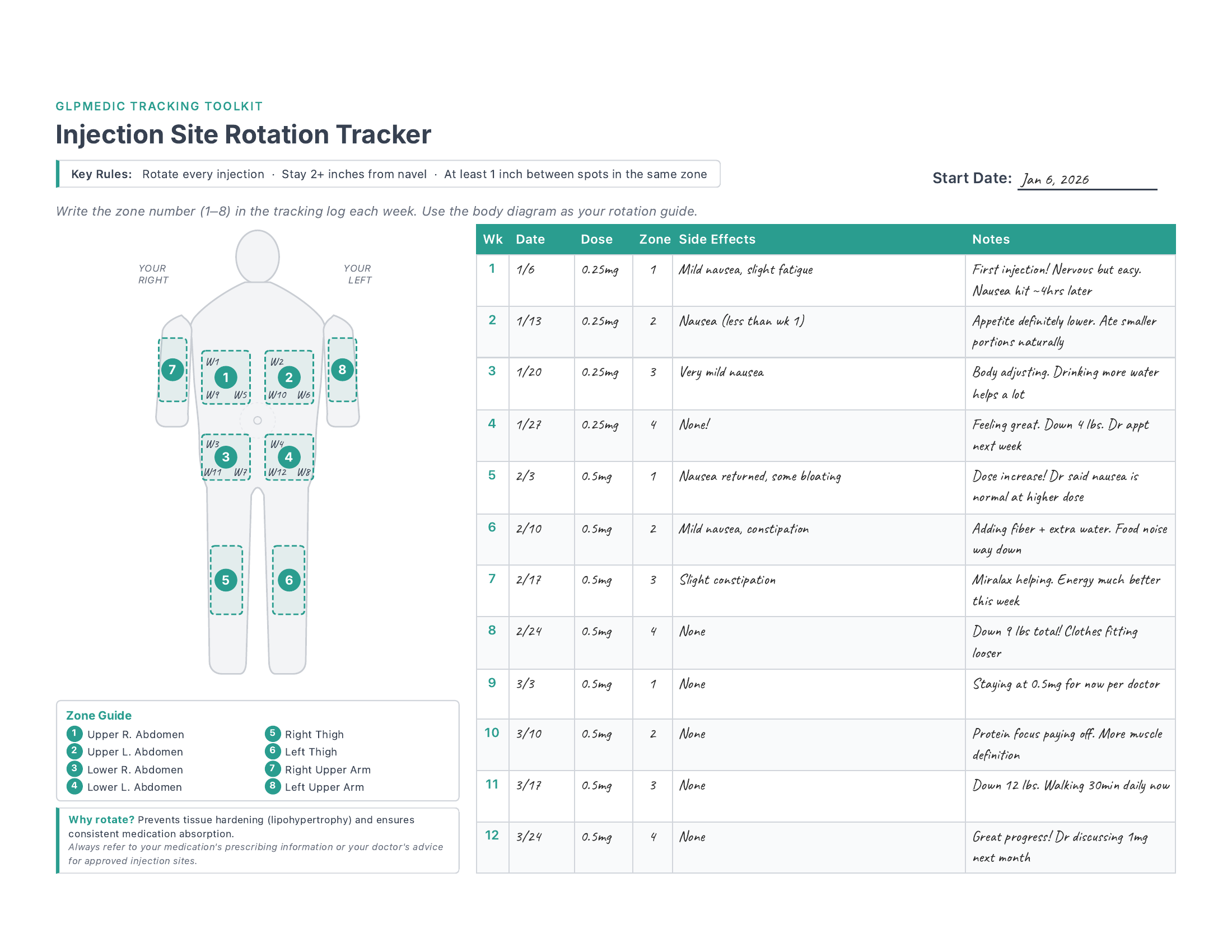
See it in action — 12 weeks of rotation through abdomen zones, with a dose increase at week 5. The body diagram shows where each injection went, and the log captures side effects at each dose level.
What's Included
Body Diagram with 8 Zones
A clear front-view body outline with all approved injection areas mapped and numbered: four abdomen quadrants, both thighs, and both upper arms.
12-Week Tracking Log
One row per week with columns for date, dose, zone number, side effects, and notes. Covers a full dose escalation cycle so you can see your entire journey.
Rotation at a Glance
The zone numbering system connects the body diagram to your log. Just write the zone number each week — you can see your rotation pattern instantly.
Quick Reference Guide
Key rotation rules printed right on the template: minimum spacing between spots, the belly button exclusion zone, and why rotation matters for your health.
When I first started injecting, I picked one spot on my left abdomen and just kept going back to it — it was comfortable and I knew what to expect. After a few weeks, I noticed a small firm area forming under the skin. My doctor explained it was lipohypertrophy from not rotating, and that it could actually affect how well the medication absorbs. Once I started systematically rotating through different zones, the lump resolved and I never had the issue again. A simple tracker like this would've saved me from learning that lesson the hard way.
How to Use This Template
- 1 Print in landscape and write your start date at the top. If you're binder-organizing, 3-hole punch the top edge.
- 2 Choose your starting zone from the body diagram. Most people start with the abdomen (zones 1-4) since it's the most accessible and has the fastest absorption.
- 3 Each injection day, write the zone number in the tracking log along with your date, dose, and any side effects. Move to the next zone each week.
- 4 Use the notes column to track how the injection felt at each site, any bruising or tenderness, and what your doctor says about your rotation pattern.
- 5 Bring it to appointments. Your provider can quickly see your rotation history and whether any sites are being overused — especially helpful during dose changes.
Get the Full Tracking Toolkit
This template is just one of 23. The full bundle gives you everything you need to track your entire GLP-1 journey.
Daily & Weekly
- Daily Check-In
- Weekly View
- Weekly Reflection
- Habit Streaks
Health Monitoring
- Side Effects
- Injection Sites
- Body Measurements
- Blood Work
- Sleep
Progress & Milestones
- 8-Week Tracker
- 12-Week Dashboard
- Progress Charts
- NSV Tracker
- Clothing Timeline
Nutrition & Lifestyle
- Protein Tracker
- Meal Planning
- Food Diary
- Exercise Log
- Hydration
Planning & Reference
- Appointment Prep
- Medication Supply
- Cost Tracker
- Support Network
Bonus
- Free access to every future template — as the toolkit grows, so does your bundle. No extra cost, ever.
- Request custom templates — need something specific? Reach out to Brandon and he'll build it for you.